
NYT Cooking: Quick Tasty Meals
The New York Times CompanyFood & Drink
4.94.29K Reviews
- Version
- 2.142.0
- Installs
- 1.00M
- Age Rating
- Everyone
Screenshots


Our Review of NYT Cooking: Quick Tasty Meals
 Analysis by Appyee
My most useful way to approach a recipe app is to treat it as a small kitchen system, not just a place to scroll when I’m hungry. That’s where NYT Cooking: Quick Tasty Meals makes sense: it can help me decide what to cook, keep promising ideas together, and turn a recipe into a practical shopping plan. I wouldn’t expect it to do the planning for me, but a few repeatable habits make it more valuable than browsing recipes at random.
Start with the meal you actually need
When I open a cooking app, I first narrow down the real problem: am I looking for dinner tonight, something I can prepare ahead, or a way to use ingredients already in the kitchen? The filters described in the app are useful for that last-minute decision, especially when I search around what I have rather than beginning with a dish name. I’d still check the recipe details before committing, since an ingredient match does not automatically mean I have every item or enough time to cook comfortably.
A realistic weekday routine might look like this: I check what needs using, browse recipes that fit those ingredients, then choose one that suits the time and dietary needs of the people eating. Once I settle on a dish, I save it if I expect to make it again and add its ingredients to the shopping list when I’m missing something. That small sequence—search, inspect, save, shop—cuts down on the familiar loop of opening the fridge, closing it, and ordering something because no plan came together.
Make saved recipes and lists work together
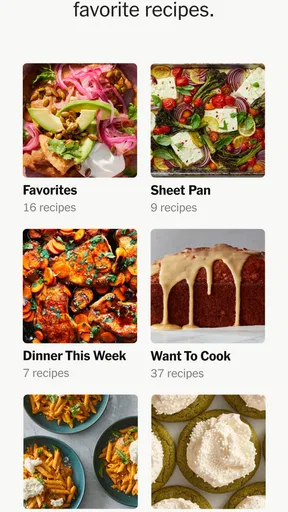
Collections become more useful when they reflect decisions I make repeatedly. Instead of saving every attractive recipe into one long pile, I’d keep a few practical groups, such as dependable weeknight meals, dishes to try on a slower day, or recipes that suit a particular household preference. The benefit is not simply having favorites stored; it is being able to find the right kind of option quickly when the same meal-planning problem comes around again.
The shopping list can also be a planning tool rather than just a reminder at the store. I’d add ingredients after choosing a recipe, then check the list against what I already have before shopping. That avoids buying a duplicate pantry item and gives me a chance to notice whether a recipe depends on several things I would use only once. If it does, I can decide whether to swap plans or make a small shopping trip worthwhile. I would not assume that a list replaces checking quantities and ingredients in the recipe itself.
What to check before relying on a recipe
Filters make browsing faster, but I see them as a shortlist, not a guarantee. Dietary labels and ingredient searches can point me toward suitable ideas, yet I would read the full recipe to check for ingredients that matter to me, preparation steps, and whether the method fits my equipment and experience. That extra look is particularly worthwhile when cooking for someone with an allergy or a strict dietary requirement: a broad category is not a substitute for checking every ingredient.
Time is another detail I would judge realistically. A recipe that sounds quick may still involve chopping, waiting, or several pans, so I’d scan the instructions before choosing it for a tight evening. For a relaxed meal, I’m happy to take on a longer process; when I need dinner soon, I want instructions that match the time and attention I can actually give. This is a useful habit with any recipe service, and it matters more than a promising dish title.
Where it fits among cooking options
Compared with a general web search, a dedicated recipe app can make it easier to keep a saved set of dishes and move from a recipe to a shopping list in one place. Compared with a personal notes file, it offers a broader source of recipes and a way to browse beyond the meals I already know. But neither comparison makes it the right answer for every cook: someone who already has a reliable system of family recipes may prefer that, while a person who wants unrestricted recipe hunting across many publishers may be happier searching the wider web.
I also wouldn’t choose it solely because I want a free download. The app is free to install, but it offers in-app purchases, so I’d check what access I need before building my routine around it. It comes from The New York Times Company and is a food-and-drink app with an Everyone age rating. Its current version is 2.124.0, and it requires Android 10 or later. If I’m deciding whether it belongs on my phone, I’d consider both that compatibility and whether its recipe library suits the way I cook.
The User Experience
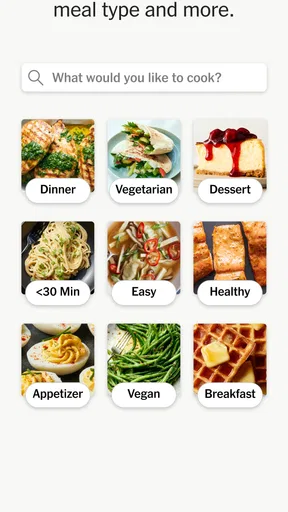
First things first, navigating the NYT Cooking: Quick Tasty Meals app is a breeze. The interface is clean, intuitive, and incredibly user-friendly. Everything is laid out in a way that makes finding recipes a piece of cake. You’ve got your main categories like breakfast, lunch, and dinner, but they also throw in some fun ones like "Brunch" and "Late-Night Cravings." It’s like they just get me, you know?
Now, if you’re worried about getting overwhelmed by the sheer number of recipes, don’t be. The app has this nifty filter system where you can sort recipes by ingredients, dietary preferences, and cooking time. This feature is a lifesaver, especially when you’re in a rush or trying to use up what’s in your fridge. Just enter what you have, and voila! Dinner ideas at your fingertips.
Recipe Variety and Quality
Let’s talk about the recipes themselves because, after all, that’s the main course here. The app offers a splendid variety, catering to all kinds of tastes and dietary needs. Whether you’re a meat-lover, vegetarian, or gluten-free, there’s something for everyone. I tried out a few dishes, and they turned out pretty darn good, if I say so myself.
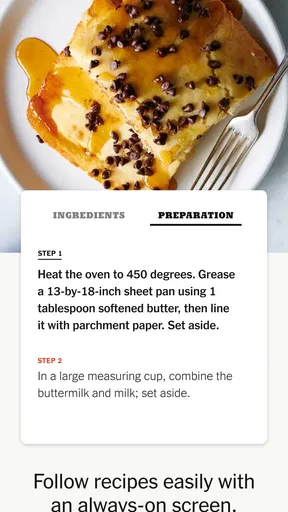
The recipes are detailed enough for beginners but not overly complicated for seasoned chefs. Each recipe comes with step-by-step instructions, which are super handy. Plus, they include cooking tips that make you feel like you’ve got a personal chef guiding you. I even managed to impress my picky eater friend with a couple of these meals, which is no small feat!
Features Worth Highlighting
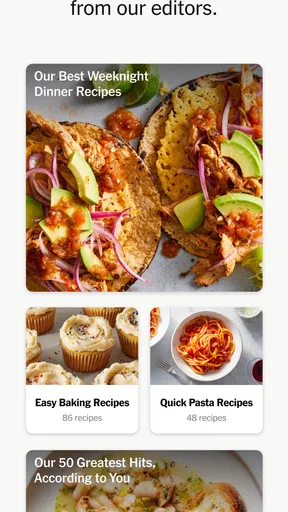
One of the standout features of the app is the ability to save recipes and create personalized collections. This means you can bookmark your favorites and have them ready whenever you need to whip up something special. It’s like creating your own little cookbook.
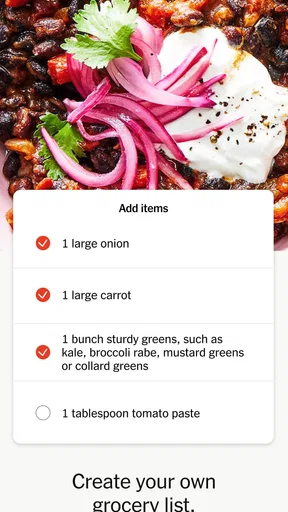
Another feature I found incredibly useful is the shopping list integration. You can add all the ingredients from a recipe to your shopping list with just a tap. It’s perfect for planning grocery trips and ensures you never forget that crucial ingredient. Plus, you can check off items as you shop, which makes the whole process so much smoother.
Community and Support
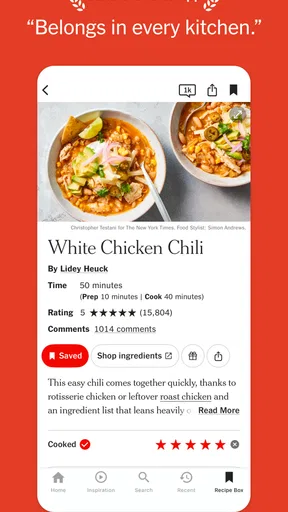
What’s cooking without a little community flavor? The app allows users to rate and review recipes, which is super helpful when deciding what to try next. It’s like having a group of foodie friends sharing their honest opinions. You can also leave comments and share your own tweaks and tips, making it a collaborative experience.
If you ever run into any issues or have questions, the app has a support section that’s quite responsive. They’re always updating with new features and bug fixes, so you know they’re listening to user feedback, which is always a good sign.
Advanced limits and everyday fit
The app is at its best when I want a curated place to browse, save recipes, and plan a grocery run. It is less compelling if my main need is a strict meal-prep calendar, detailed nutrition tracking, or a way to coordinate a household’s tasks. I would not assume a recipe collection automatically becomes a complete planning system; I still need to decide when to cook, what can be prepared ahead, and whether leftovers will suit the next day.
There is also a difference between inspiration and a dependable repeat. A highly rated recipe can still be wrong for my kitchen, taste, or schedule. I’d use ratings and comments as context, then make a note of the changes that worked for me. If I’m adapting a dish, I’d be cautious about changing several important ingredients at once, especially when the recipe relies on a particular method. That way I can tell whether a tweak improved the meal or simply made the result harder to reproduce.
The app has a 4.6 average from around 15,000 ratings, with roughly 3,600 written reviews, and it has been installed over 500,000 times. Those figures suggest it has found an audience, but they don’t tell me whether a recipe will suit my household. I’d treat them as useful context, not a reason to skip checking the actual instructions or deciding whether the app’s approach matches my habits.
Who will get the most from it
I’d recommend it to cooks who want dependable inspiration without turning meal planning into a separate project. It should suit someone building confidence in the kitchen, a busy household that rotates between familiar meals and new ideas, or a cook who likes saving recipes instead of relying on screenshots and browser tabs. The combination of browsing, collections, and shopping lists is especially handy when I want to move from “what sounds good?” to “what do I need to buy?” without starting over each time.
On the other hand, I’d skip it if I rarely cook from recipes, already have a strong personal cookbook, or need extensive customization for a medically restricted diet. A web search may be better for comparing a very specific technique across many sources, and a basic notes app may be enough for someone who only wants to store a handful of family recipes. The right choice depends less on how many recipes an app offers and more on whether I’ll actually use its way of organizing them.
Final Thoughts
All in all, the NYT Cooking: Quick Tasty Meals app is a delightful addition to any kitchen. It’s packed with a variety of recipes that are both quick and tasty, making it perfect for busy bees and culinary adventurers alike. While it’s mostly a hit, there’s always room for more recipes and maybe a few more dietary-specific options. But hey, no app is perfect, right?
If you’re ready to spice up your meal routine and have some fun in the kitchen, I’d definitely recommend giving this app a try. You might just find your new favorite dish waiting for you there. Happy cooking!
Privacy and Permissions
See what permissions an app requests and how it handles your data.
- Microphone
- record audio
- Wi-Fi connection information
- view Wi-Fi connections
- Other
- view network connections, full network access, prevent device from sleeping
Verdict
Strengths of NYT Cooking: Quick Tasty Meals
- User-friendly interface for easy navigation.
- Wide variety of recipes for all tastes.
- Step-by-step guides simplify cooking.
- Customizable shopping lists available.
- Offline access for cooking on the go.
Limitations of NYT Cooking: Quick Tasty Meals
- Subscription required for full access.
- Occasional app crashes reported.
- Limited free content without subscription.
- No calorie or nutritional info provided.
- No video tutorials for recipes.
Other Releases by The New York Times Company
View All


Similar Picks in This Category
View All
Rappi: Food Delivery, Grocery
Rappi, Inc - Delivery3.5

McDonald’s: Cupons e Delivery
Arcos Dorados4.3

Swiggy: Food Instamart Dineout
Swiggy4.7

Blinkit: Groceries & more
Blinkit4.8

foodpanda: food & groceries
Foodpanda GmbH a subsidiary of Delivery Hero SE4.0

Zomato: Food Delivery & Dining
Zomato4.7
Frequently Asked Questions
What is NYT Cooking: Quick Tasty Meals?
NYT Cooking: Quick Tasty Meals is a mobile app developed by The New York Times, designed to help users discover and prepare delicious recipes quickly. It features a wide range of dishes, from appetizers to desserts, all curated by culinary experts. The app is available on both Android and iOS platforms.
Is NYT Cooking free to use?
While NYT Cooking offers some free content, it primarily operates on a subscription model. Users can access a limited number of recipes without a subscription, but for full access to the extensive recipe database and additional features, a subscription is required. The app often offers a trial period for new users.
What features does NYT Cooking offer?
NYT Cooking provides a variety of features, including curated recipe collections, personalized recommendations, and step-by-step guides. Users can also save their favorite recipes, create shopping lists, and access expert cooking tips. The app regularly updates with new content to keep culinary enthusiasts inspired.
Can I use NYT Cooking offline?
Yes, NYT Cooking allows users to save recipes for offline access. This feature is particularly useful for those who might not have internet access while cooking. Simply save the desired recipes while online, and you can view them later without an internet connection.
Is NYT Cooking suitable for beginners?
Absolutely! NYT Cooking is designed to cater to all skill levels. The app includes detailed instructions and helpful cooking tips, making it accessible for beginners. Whether you’re a novice or an experienced cook, you’ll find recipes and guidance tailored to your skill level.
